(Handling Personal Information)
All personal information provided by entrants will be used exclusively for the judgments of the competition, and thus will not be used for any other purposes.
Choosing the entry form
Choose one entry form: either Japanese or English.
*Sample of entry form (The final entry form may differ from the sample.)
* The below mentioned details must be filled out on the entry form,
(1) Data of applicant, name of work, submission category (2) Concept of work (3) Description of work
(Caution)
*JAVA Script & Cookie are required to fill in the application form.
*Complete filling out of form and send it in one operation. Closing an incomplete form deletes all sections filled out.
In order to save time when filling out the form, it is better to type out the concept and description of your work in advance, and copy and paste to the entry form.
Incomplete entry forms will not be accepted
sample


Make sure to write number the images indicating their order.
Provide a short description in 50 words or less associated with each numbered image.
Click 'Attach Image' in the section of description of work image, and select the image that you want to attach.
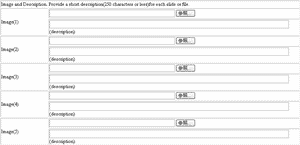
Click 'Confirm' after completing steps (1) to (3) in the entry form. The text that you have filled in will be displayed.
If there are no mistakes, type your name and click 'Enter'.
If there are mistakes, click 'Correction'.
Attention: When you click the correction button and return to the previous page, the graphics file(s) you have already selected and attached will be cleared from the application. Please remember to reselect the graphics file(s) of your work and reattach it before completing the application.

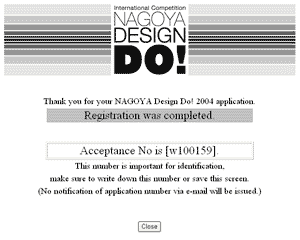
After completing the entry form, your application number will be shown.
This number is important for identification, make sure to write down this number or save this screen.
Only one work can be submitted by each applicant or group.
When one applicant or group submits several works, only the first entry can be accepted.
All other works by the same applicant cannot be accepted.
Entry Form for the First Judging
(Notice)
Conclusion of registrations for the first screening on PM 5:00 , May 12th, 2008.
The online entry form will only be active during the application acceptance period,
which is between April 1, 2008 and May 12, 2008(JST). The form will be inactive at other times.
For further details, please refer to "Application via the website".


(Handling Personal Information)
All personal information provided by entrants will be used exclusively for the judgments of the competition, and thus will not be used for any other purposes.

Download the application form and compete it. Attach the text data of the completed
application form to the work and send CD-ROM by post.
In addition, please print out the completed application form and include it in the envelope with the CD-ROM.